

DomoDomo
All in One Agentic Tool Hub


Make every key press and click feel satisfying.
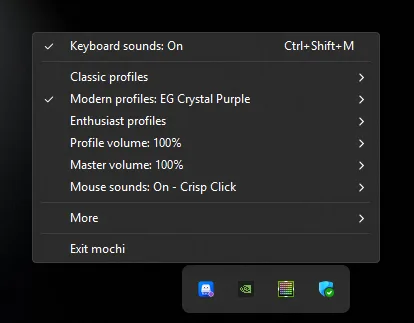
Choose from 12 keyboard sound profiles and 4 mouse click packs, then fine-tune master and per-profile volume from the system tray. Mochi supports native Windows dark/light menus, a global mute shortcut, optional key-release sounds, and launch at sign-in.
Built for people who want their desktop to feel more tactile, playful, and personal—whether they are writing, coding, gaming, or working all day.
All in One Agentic Tool Hub
Create cute, interactable, and so pretty digital gifts and love letters
Mechanical keyboard sounds for Mac & Windows
Sign in to join the discussion.
Sign in to commentBased on 1 review
Satisfying sounds. I love it!
Add GUI
Add more features for customization


Even after installing desktop app, sounds stay enabled, and opening app only lets me toggle sounds on/off instead of adjusting volume or profiles.
Also noticed that after uninstalling, sound effects kept running until I manually ended Mochi from Background Processes in Task Manager.
Is this expected behavior, or am I missing something? It might also be nice to have an easier way to fully stop or exit Mochi without needing Task Manager.
Would a visual interface for previewing sound profiles, adjusting volume, and choosing mouse feedback make the experience better for you?
If so, what would matter most: cleaner controls, profile previews, better onboarding, or deeper customization?